




Ga naar de hoofdinhoud

FOR IN-HOUSE MARKETING TEAMS

More output. Same team.
Every draft on brand.

One approved AI workspace for your whole marketing team. Brand rules, briefs, campaign signals and approvals in one place. Agents prepare the work, your team decides what goes live.

  • 1approved AI workspace for the whole team

  • 0drafts go live without a review

  • 20minutes to see it on your own campaign

THE TEAMS ALREADY RUNNING ON GROWF

  • consellium-grey
  • campagne-grey
  • UBO-grey
  • canvass-grey
  • oddgrips-grey
  • CX-grey

More channels. More asks. Same headcount.

The work got faster.
The team didn't.

Your team ships more than ever, with AI in every tab. But brand rules, drafts, results and decisions live apart. You see the output, not the control.

  • SHADOW AI

    AI in every tab, no shared rules.

    Everyone drafts in their own chat tool. Brand voice and audience get re-explained, or skipped.
  • CAPACITY

    Demand grows faster than headcount.

    More channels and campaigns land on the same people, and the backlog becomes the strategy.
  • LATE SIGNALS

    You hear it when the budget is gone.

    A slipping campaign waits until someone opens the dashboard, usually at the monthly review.
  • NO PROOF

    Hard to show what marketing moved.

    Results sit in six tools. The board asks what worked, and the answer takes a week to build.

WHAT YOUR TEAM GETS BACK

Four jobs agents take on.
Your team keeps the call.

Agents watch campaigns, draft content and build reports from your approved context. Nothing goes live until someone on your team says so.

  • Marketing teams icon: benefit-one-place

    One place to see the work.

    Brand, campaigns, performance and decisions sit together.
  • Marketing teams icon: benefit-agents-move

    Agents move work forward.

    Scheduled checks and drafts are prepared for your team.
  • Marketing teams icon: benefit-team-call

    Your team takes the call.

    Review what matters, approve what ships and keep the learning.

1 / 4

Marketing teams icon: uc-signal-action

SIGNAL → ACTION

WITH APPROVAL

From campaign signal to team decision

Growf checks campaign goals and connected results, suggests a response and puts it in front of your team. Reviews stay with the work.
  1. Marketing teams icon: uc1-spots

    Spots

    a signal

  2. Marketing teams icon: uc1-prepares

    Prepares

    a next step

  3. Marketing teams icon: uc1-approve

    You approve

    what goes live

  4. Marketing teams icon: uc1-keeps

    Keeps

    the learning

Output

  • SIGNAL
  • NEXT STEP
  • APPROVAL
  • FEEDBACK
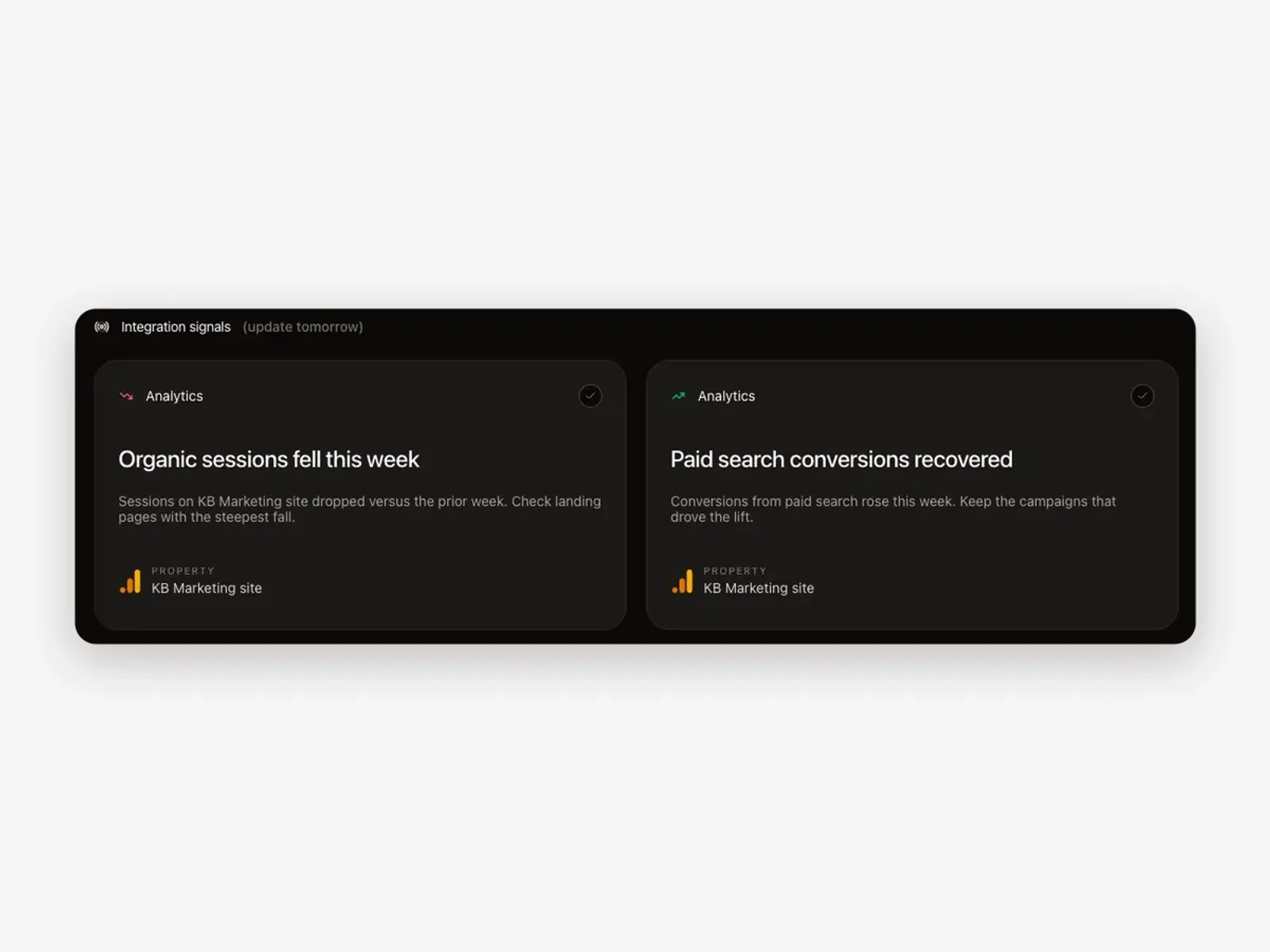
Integration signals on the Growf dashboard, each with the next step it suggests for the team
Marketing teams icon: uc-recurring-work

RECURRING WORK

Let agents prepare recurring work

Set the goal, cadence and brand rules. Agents monitor campaigns, prepare content ideas and draft reports; your team checks the output.
  1. Marketing teams icon: uc2-goal

    Define the goal

    per workflow

  2. Marketing teams icon: uc2-watch

    Watch the work

    on schedule

  3. Marketing teams icon: uc2-prepare

    Prepare

    briefs & alerts

  4. Marketing teams icon: uc2-review

    Team reviews

    before action

Output

  • PERFORMANCE
  • CONTENT
  • REPORT
  • MORNING BRIEF
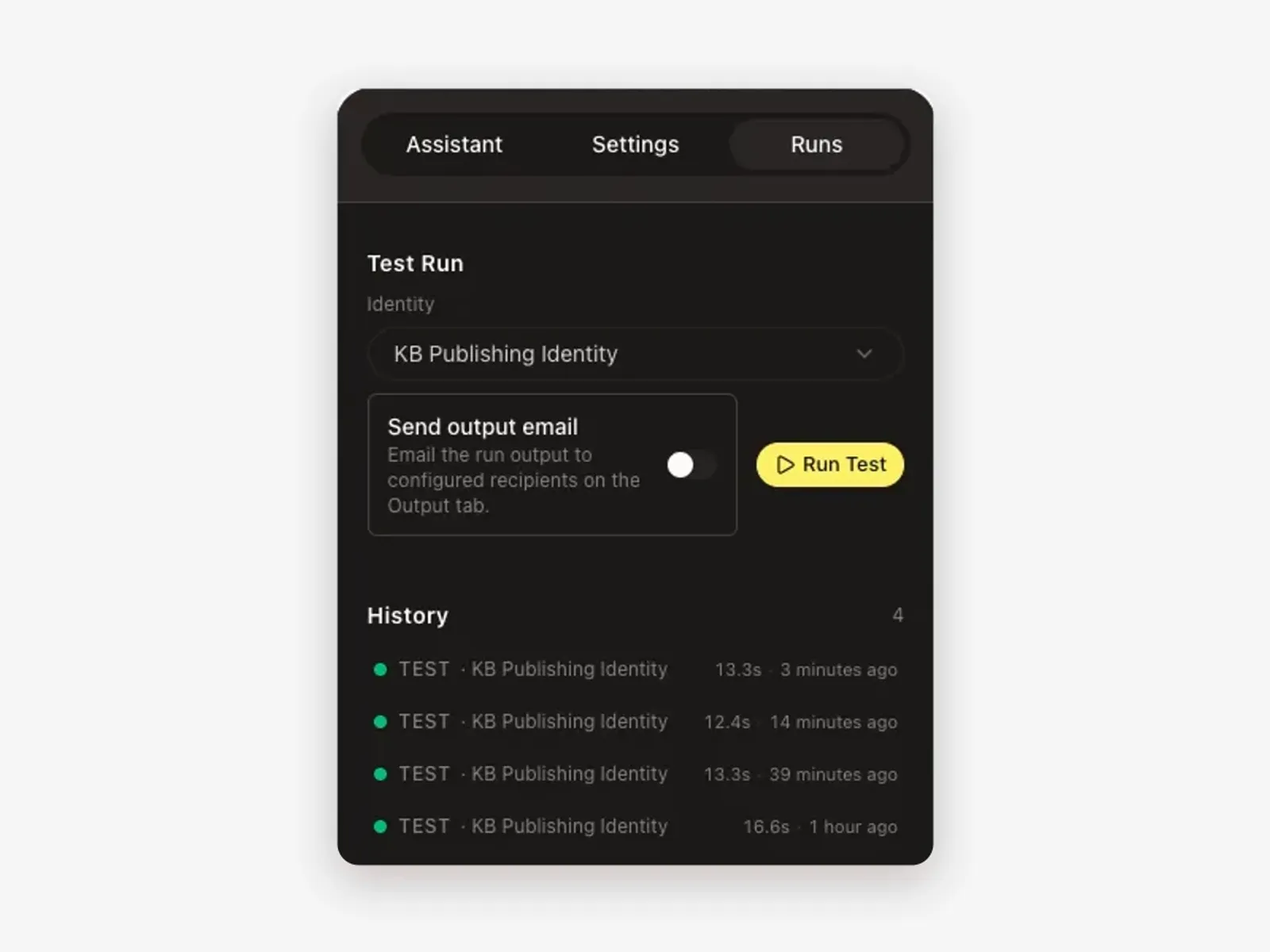
The Runs panel of a Growf agent with a test run and the history of completed runs
Marketing teams icon: uc-reporting

REPORTING

Make campaign reporting team-ready

Agents turn connected results into a source-linked draft report. Your team adds context, approves the story and shares it with stakeholders.
  1. Marketing teams icon: uc3-connect

    Connect data

    from campaigns

  2. Marketing teams icon: uc3-summarize

    Summarize

    results and trends

  3. Marketing teams icon: uc3-review

    Review

    team adds context

  4. Marketing teams icon: uc3-share

    Share

    approved report

Output

  • KPI
  • TRENDS
  • SOURCE LINKS
  • SUMMARY
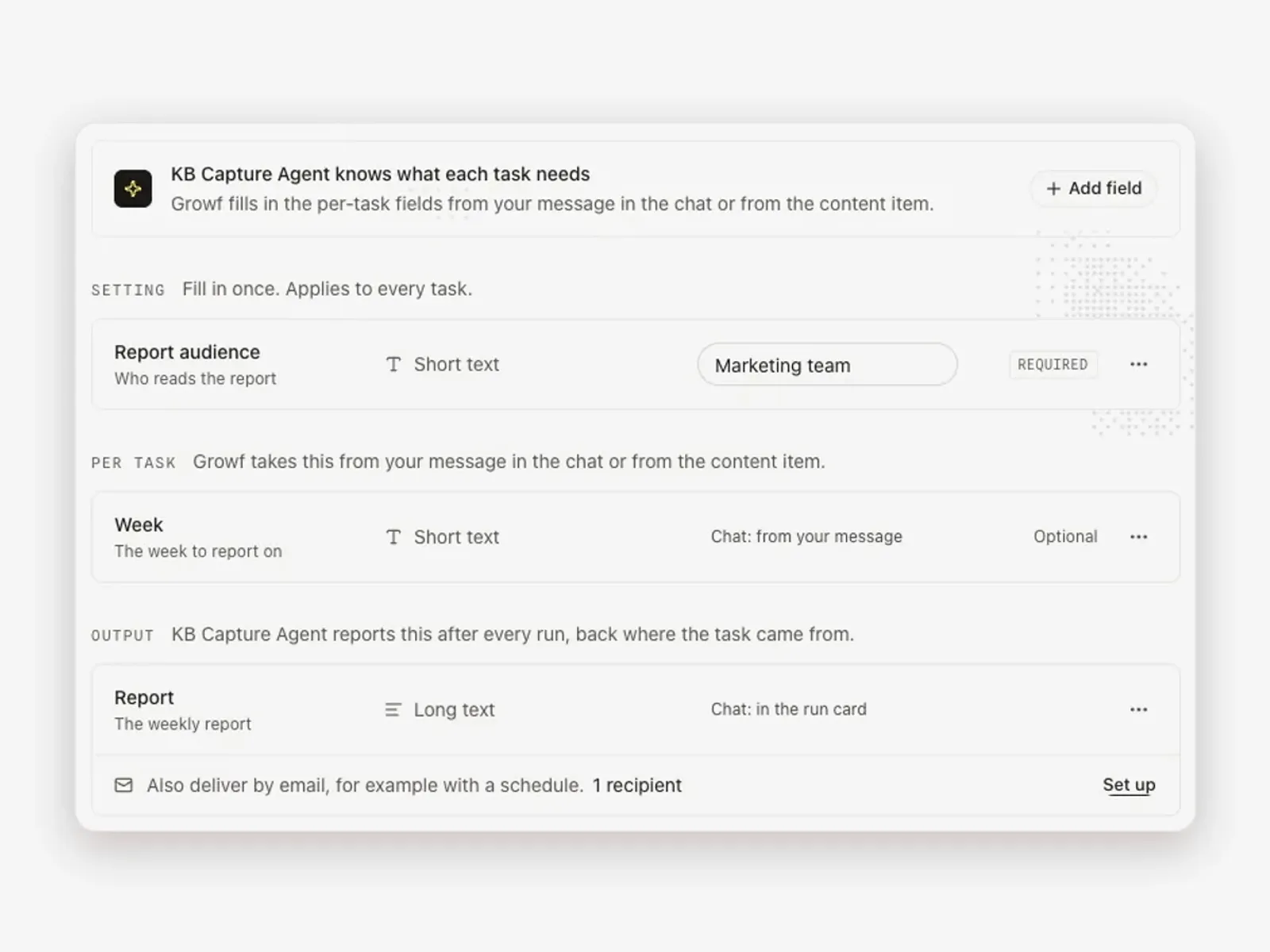
A Growf reporting agent that writes the weekly report for the marketing team and delivers it by email
Marketing teams icon: uc-on-brand

ON-BRAND CONTENT

Create on-brand content together

Turn an approved campaign brief into first drafts for each channel. Growf uses brand voice and audience context; your team edits and approves.
  1. Marketing teams icon: uc4-brief

    Set the brief

    goal, audience, voice

  2. Marketing teams icon: uc4-draft

    Draft

    channel-ready copy

  3. Marketing teams icon: uc4-review

    Review

    with your team

  4. Marketing teams icon: uc4-publish

    Publish

    after approval

Output

  • AD COPY
  • SOCIAL POSTS
  • EMAIL
  • BLOG
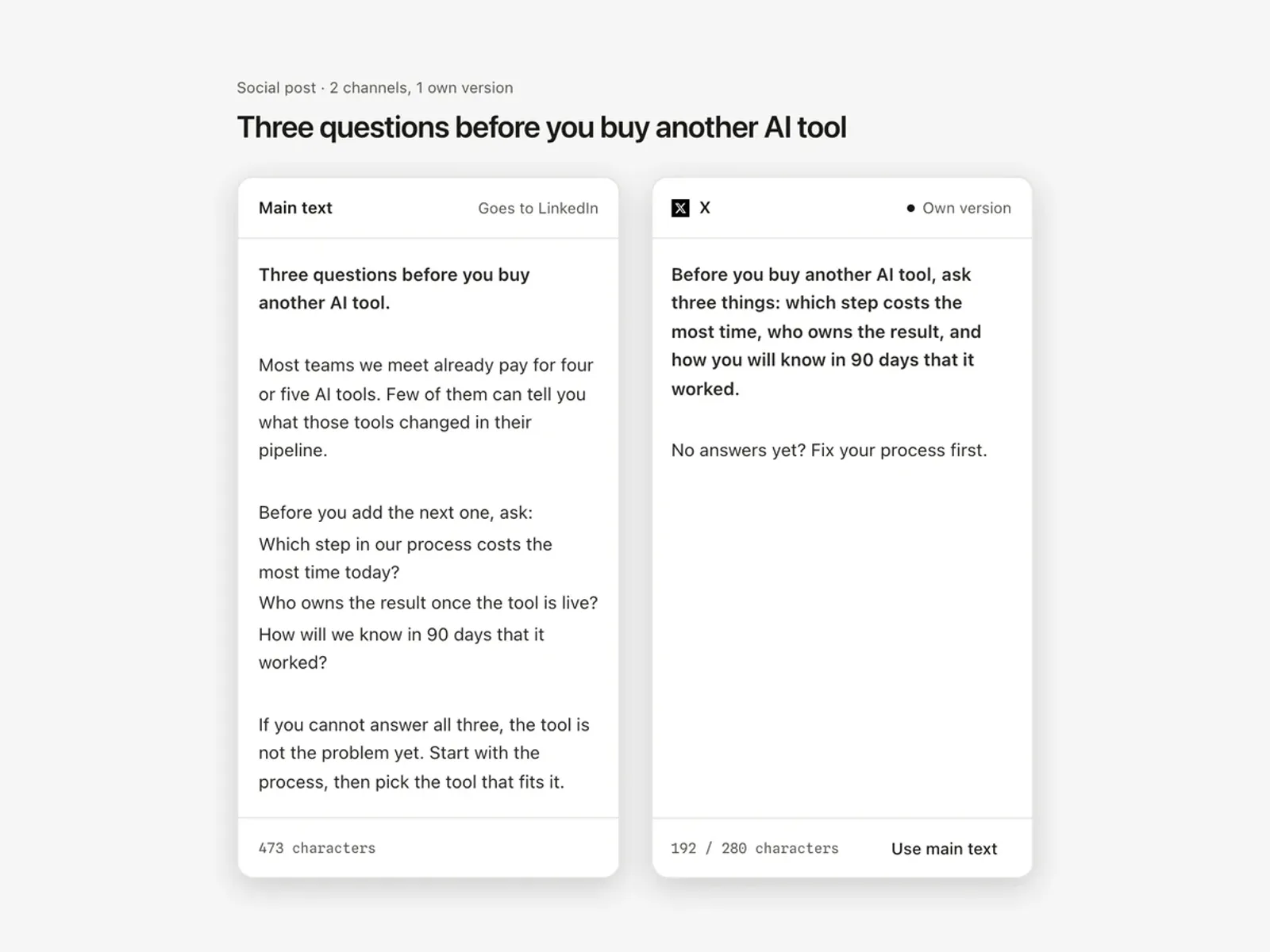
One social post in Growf with the main text, the LinkedIn version and a shorter X version side by side

Start with one campaign.

Add one live campaign, its brand rules and latest brief. See how Growf prepares on-brand work, checks signals and keeps reviews together.

Marketing teams icon: team-network

One team. Work that keeps moving.

Context, agents, decisions and results stay connected, so each next action starts further ahead.
  • Your team controls access.

  • Start with one live campaign.

  • Add workflows as your team grows.

ONE CAMPAIGN, ONE MORNING

A paid campaign slips.
The next message is ready.

What a Tuesday morning looks like with Growf: the signal, the draft and the decision, all in one place and all before the stand-up.

  • THE SIGNAL

    TUE 08:00

    Marketing teams icon: screen-signal

    Scheduled check · Paid social

    Q4 Demand campaign · LinkedIn + Meta

    Conversions, last 7 days
    41 of 60
    Spend on pace
    74%

    WHAT GROWF NOTICED

    Conversions are 32% below target with 11 days left. The CTA variant with the pricing angle converts 2.1x better than the current lead message.

  • THE DRAFT

    TUE 08:02

    Marketing teams icon: screen-draft

    Revised ad message · LinkedIn

    Prepared by the campaign agent

    Know your cost per order before you scale the next channel.

    See the full picture of what each campaign returns. Book a 20-minute walkthrough on your own numbers.

    BUILT FROM

    • BRAND VOICE
    • Q4 BRIEF
    • PRICING ANGLE · 2.1X
    • AUDIENCE · OPS LEADS
  • THE DECISION

    TUE 09:15

    Sanne, paid media lead

    Reviewed the draft and the signal

    Sharpen the CTA to “See your cost per order”, keep the rest. Shift 20% of Meta budget to LinkedIn for the last 11 days.

    DECISION SAVED TO THE CAMPAIGN

See this on your own campaign.

Bring one live campaign and your brand rules. We run the check, the draft and the review live, on your work, in 20 minutes.

20 MINUTES · NO SLIDES

THE WORKSPACE FOR YOUR WHOLE TEAM

See the full picture.
Keep work moving.

Keep brand guidance, campaign briefs, content drafts, performance results and approvals together. Creators, channel leads and managers work from the same context.

  • No hunting for context.

    Goals, brand rules and campaign decisions stay beside the work.
  • Reviews stay with the work.

    See what changed, who approved it and what comes next.
  • Work moves between people.

    New teammates can pick up from the latest approved context.
  • You control access to your workspace.

    Team roles and a DPA are available.

GROWF · YOUR WORKSPACE

4 CONNECTED AREAS

  • BRBrandPOSITIONING · VOICE · 3 PERSONAS · GUIDELINESOPEN
  • PFPerformanceGA4 + META + LINKEDIN · SCHEDULED CHECKS · ALERTSLIVE
  • CRCreativeCAMPAIGN BRIEFS · CONTENT DRAFTS · TEAM REVIEWSLIVE
  • RPReportingWEEKLY REPORTS · SOURCE LINKS · TEAM REVIEWDRAFT
Marketing teams icon: team-network

Every team and agent sees the same picture.

Plans, signals and approvals stay connected from the first brief to the next campaign.

CONTEXT YOUR TEAM SHARES

  • Marketing teams icon: ws-strategyStrategy
  • Marketing teams icon: ws-brand-voiceBrand voice
  • Marketing teams icon: ws-audiencesAudiences
  • Marketing teams icon: ws-knowledgeKnowledge
  • Marketing teams icon: ws-assetsAssets
  • Marketing teams icon: ws-connected-channelsConnected channels

POWERING THE NEXT MOVE

  • Brand
  • Performance
  • Creative
  • Reports
  • Agents
  • Content
  • + yours

ONE APPROVED PLACE FOR AI

One approved place for AI.
Not fourteen chats.

Your team already uses AI. Growf makes it one shared, governed workspace: brand rules built in, your choice of model, review before publishing and your data under your control.

  1. BRAND RULES

    Guardrails built in

    Positioning, tone of voice and approved examples sit in the workspace. Every draft starts from them, whoever asks.
  2. YOUR MODEL

    OpenAI, Claude or Gemini

    Pick the model per task or set a default. Switch providers without losing context or history.
  3. YOUR TOOLS

    Connected, not replaced

    GA4, Meta, LinkedIn, HubSpot, Drive and Notion feed the work. Nothing moves to a new stack.
  4. CONTROL

    Review, roles and a DPA

    Nothing publishes without a review. Role-based access, no training on your data, DPA on request.

Same rules, same context, same approval for everyone. Your team moves freely, and the rules move with them.

WHAT CHANGES FOR YOU

Same headcount.
A clearer next move.

The tools stay. The team stays. What changes is that signals, drafts and decisions reach you ready to act on.

TODAY

WITH GROWF

  • Every teammate briefs their own chat tool

    Everyone starts from the approved brand and brief

  • Drafts, results and decisions spread over six tools

    Context and decisions live beside the work

  • A slipping campaign waits for the monthly review

    Agents flag it and prepare the next step for review

  • Feedback stays in a comment or meeting note

    Reviews and decisions inform the next campaign

  • The board asks what worked. The answer takes a week

    Source-linked reports, ready for your team to approve

CHOOSE YOUR AI PROVIDER · CONNECT YOUR EXISTING MARKETING TOOLS · KEEP ONE APPROVED CONTEXT

QUESTIONS MARKETING TEAMS ASK

Before you put agents to work.

Bring one live campaign. See what Growf notices, prepares and puts in front of your team.

  • What does Growf add to ChatGPT or Claude?

    Growf connects AI to your marketing workflow: scheduled checks, suggested next steps, team approvals and feedback in one place.
  • Can an agent publish without approval?

    Your team reviews proposed changes before anything goes live. Decisions and feedback stay attached to the work.
  • How does Growf keep content on brand?

    Add brand guidance, tone of voice and approved examples to the workspace. Agents use that context for drafts; your team reviews what ships.
  • Do we need to replace our current tools?

    Growf connects to tools including GA4, Meta, LinkedIn, HubSpot, Drive and Notion. Review the integrations you need in the demo.
  • What happens in the 20-minute demo?

    You bring one live campaign and your brand rules. We show the signal, the draft and the review on your own work, then agree whether a pilot makes sense.
  • How is our data handled?

    Your data is not used to train shared AI models. Control access by role and request the DPA during onboarding.

START WITH ONE LIVE CAMPAIGN

Bring a live campaign.
See your next move.

Bring one live campaign and your brand rules. In 20 minutes you see what Growf notices, what it drafts and how your team keeps the call.

  • The signal on your campaign
  • An on-brand draft
  • The review and the decision

20 MINUTES · ONE CAMPAIGN · YOUR TEAM IN CONTROL